Karpathy’s four ideas, turned into working examples
In short: Four Karpathy ideas become tested GPT-6 Astra examples: a clear PDF, a diagram, an interactive page and a video, with screenshots and 16 prompts.
The first useful result was a number that refused to move. I doubled the AI workers in our generated support-review page. Drafting capacity rose from 40 to 80 tickets an hour. Completed work stayed at 20. The page made the reason visible: human review was the limiting stage.
That is the point of this field guide. I turned the four ideas in Andrej Karpathy’s 2 October 2026 post into working examples using GPT-6 Astra in Codex: clearer technical writing, a diagram, an interactive webpage and a narrated video. Below are the prompts, screenshots and outputs, plus three more prompts per format to try yourself.
Karpathy’s four ideas, put to work
Karpathy argues that as models do more work, people need better ways to understand it. His sequence starts with ASD-STE100, moves through diagrams and interactive HTML, and reaches bespoke explainer videos. For writing, he sometimes asks for “80% of the way to ASD-STE100.” That is his wording; the prompts in this article are my adaptations.
I read this as a useful change to the brief: specify how the explanation should help the reader. A paragraph can clarify a term. A diagram can expose a missing connection. A page can let you test an assumption. A video can reveal a mechanism in sequence.
These examples were built with tools, inspected and revised in a GPT-6 Astra-configured Codex workspace. They are executed demonstrations, not single-shot outputs or a model leaderboard. The remaining twelve prompts are suggestions; I have not run those variants.
Open the prompt library with copy buttons and output links, or work through the examples below. PDF is a convenient delivery format for the writing example, not a fifth category from Karpathy’s post.
Practitioner example 1: ASD-STE100-inspired writing
I chose DNS because it is easy to simplify the wording while accidentally simplifying away the mechanism. The test was whether a new employee could distinguish finding an address from loading a page.
ASD-STE100 combines writing rules with a controlled dictionary. A short sentence alone does not establish compliance. Our handout deliberately says STE-inspired: useful writing discipline, with no claim that the formal standard has been satisfied.
The working prompt — DNS handout
Explain DNS to a new office employee. Use writing inspired by ASD-STE100: short sentences, one idea per sentence, active voice where possible, and one term for each concept. Define DNS, resolver and cache. Keep the distinction between finding an address and loading a website. Show a dense before paragraph and a clearer rewrite. Label this STE-inspired, not verified ASD-STE100 compliance. Use Cloudflare's DNS explainer as the factual source: https://www.cloudflare.com/learning/dns/what-is-dns/. Create a readable one-page PDF with the source link and a two-question comprehension check with answers. Render the PDF and inspect it for clipping.
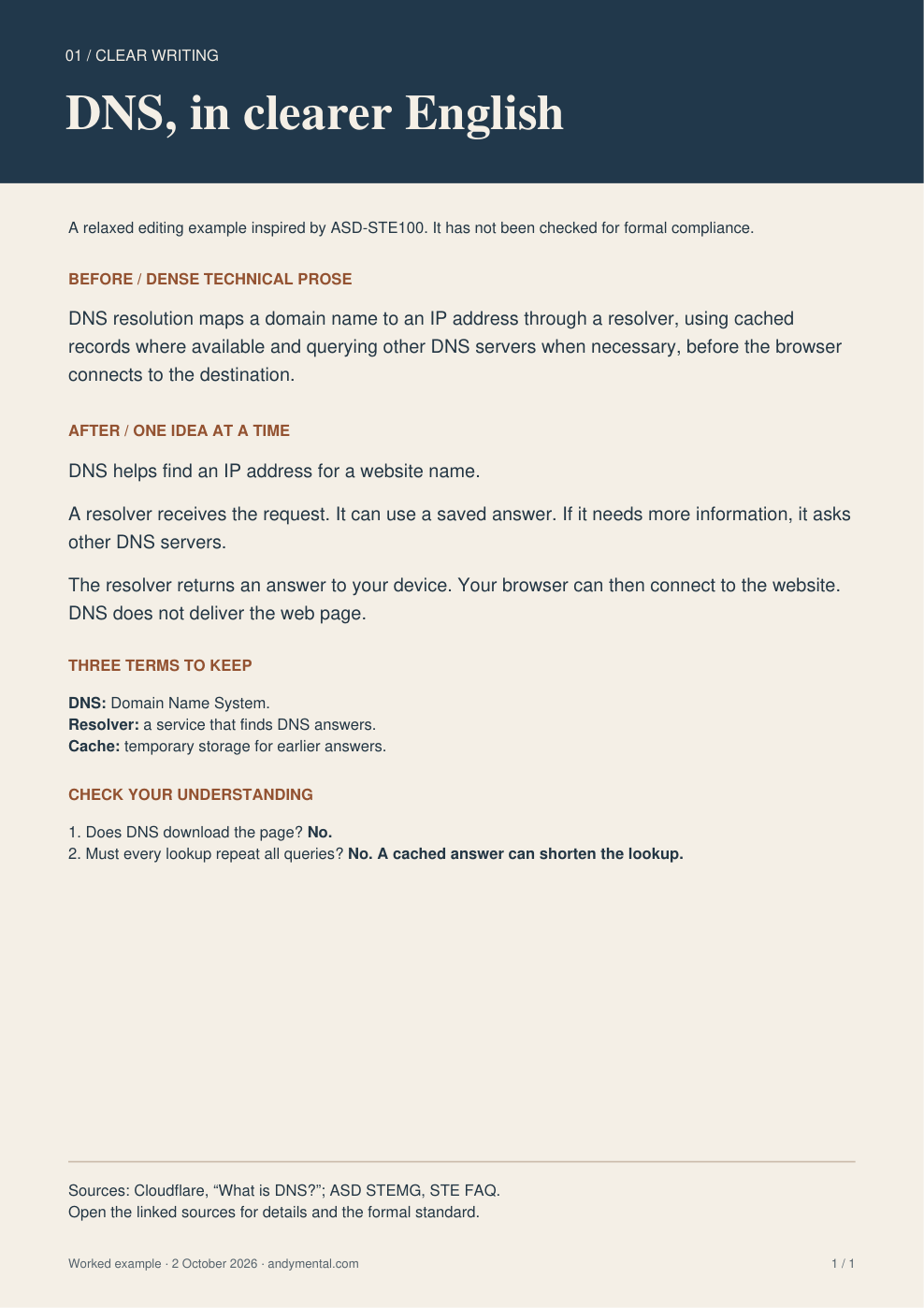
Actual rendered PDF output. Download the one-page DNS handout.
The rewrite separates the stages and retains a concrete boundary: DNS does not deliver the web page. I checked the explanation against Cloudflare’s DNS guide and inspected the single-page render for clipping. The two questions check meaning, not merely sentence length. Formal STE vocabulary checking remains outside this example.
Try it on an operating procedure
Rewrite the procedure I paste below in STE-inspired English. Use one action per numbered step, consistent terms and explicit conditions. Preserve every warning, measurement and exception. Flag ambiguous instructions instead of guessing. Return the rewrite and a table explaining material changes. Do not claim formal ASD-STE100 compliance. Procedure: [paste your procedure].
Try it on a recipe
Rewrite my recipe for someone cooking it for the first time. Use STE-inspired short sentences and direct actions. Preserve quantities, temperatures, timing and safety instructions exactly. Separate preparation from cooking. Flag missing units or unclear doneness cues. Return a printable one-page checklist. Recipe: [paste your recipe].
Try it on an employee policy
Turn the policy below into a plain-language employee guide using STE-inspired writing. Preserve eligibility, deadlines, exceptions and obligations. Keep official terms and define them. Show three examples clearly labelled as illustrations. Highlight anything that needs the policy owner's clarification. Return a before-and-after document. Policy: [paste approved text].
Practitioner example 2: a diagram with a job
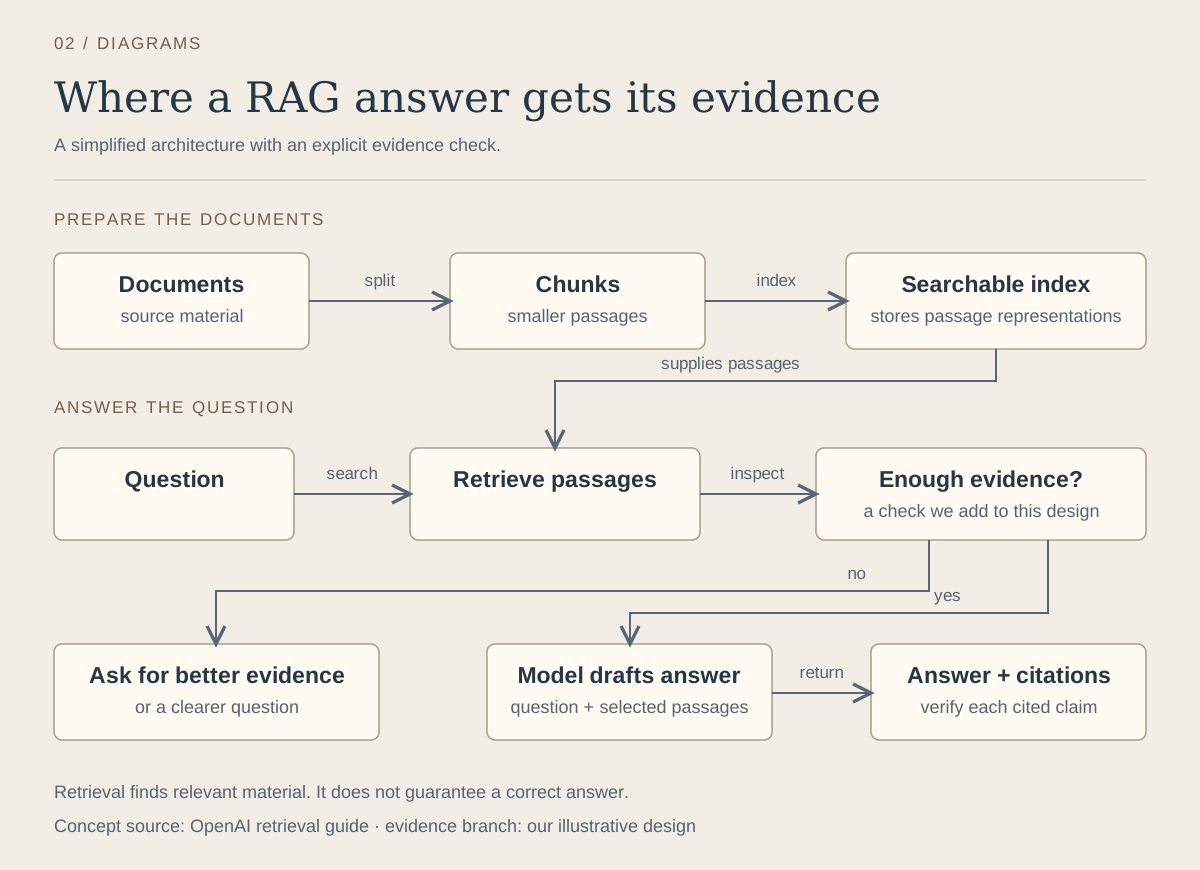
A useful diagram answers a structural question. Here, that question is where a retrieval-augmented generation answer gets its evidence, and what should happen when that evidence is inadequate.
The working prompt — RAG evidence flow
Create an editable SVG diagram that teaches a new engineer a simplified retrieval-augmented generation (RAG) workflow. Show two lanes: document preparation (documents -> chunks -> searchable index) and answering (question -> retrieve passages -> enough evidence?). A yes branch gives the question and passages to a model, which drafts an answer with citations; a no branch asks for better evidence. Connect the index to retrieval. Treat the evidence check as our proposed design, not a guarantee built into every RAG system. Use at most ten nodes, labelled arrows and large text. State that citations still need checking. Include an accessible text description. Export the SVG and an HTML page that displays it. Ground retrieval in https://developers.openai.com/api/docs/guides/retrieval.
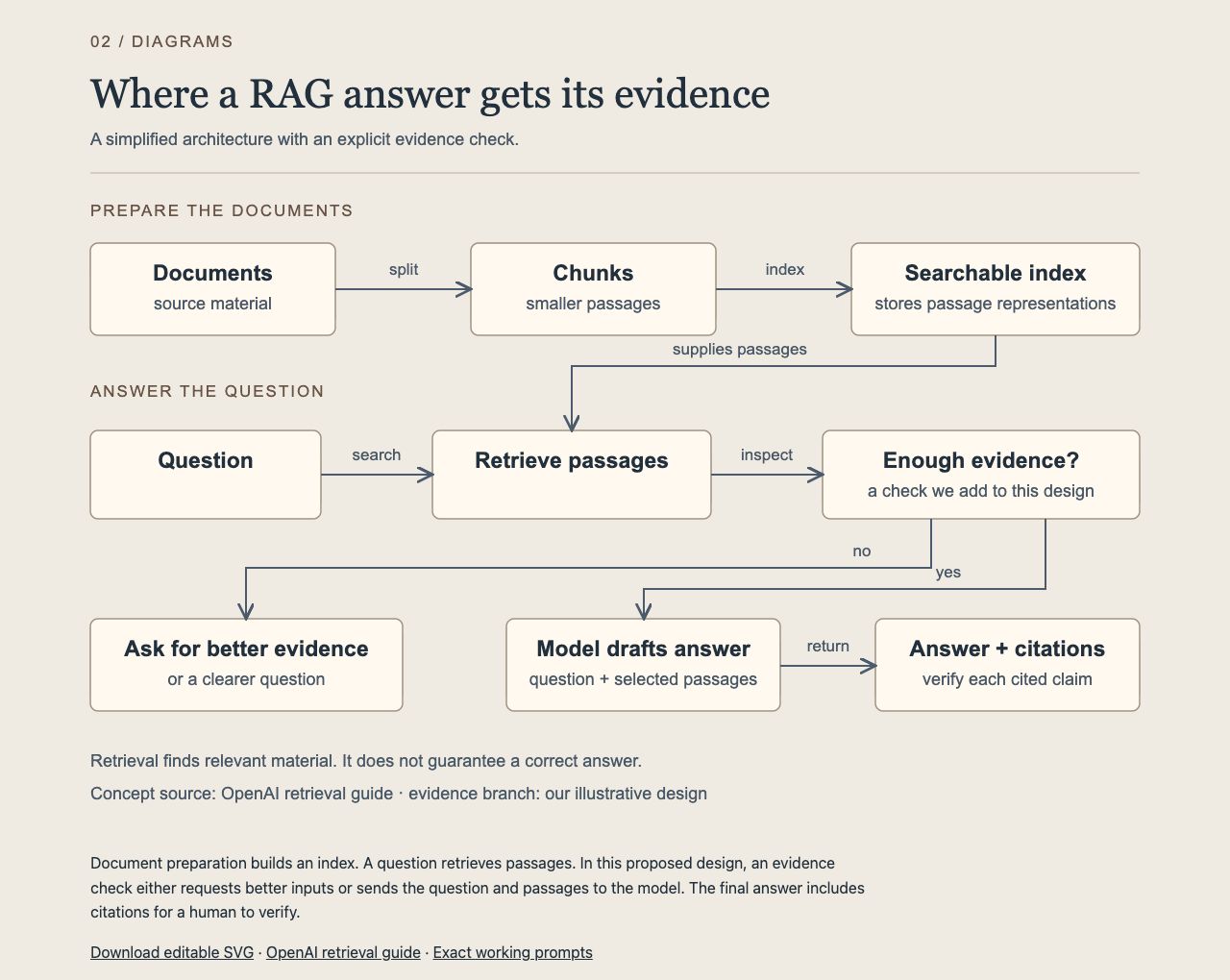
Actual browser rendering. Open the diagram page or download the editable SVG.
The result separates document preparation from answering. It also makes our proposed evidence branch visible. That branch is an architectural choice, not a capability every RAG implementation automatically possesses. OpenAI’s retrieval guide supports the retrieval mechanism; it does not guarantee that retrieved material or a cited answer is correct.
I checked the nine nodes, arrow directions and branch labels. This is a diagram, not a running retrieval system. Its value is that a reviewer can point to a specific connection and challenge the design.
Try it on science
Explain why Earth has seasons with an annotated diagram for a 12-year-old. Use NASA as the factual source. Show axial tilt, sunlight angle and opposite seasons in the hemispheres. Label scale distortions. Address the distance-from-the-Sun misconception. Produce editable SVG plus a short accessible description, and verify the geometry and labels.
Try it on a team process
Turn the onboarding process I paste below into a swimlane diagram. Give the employee, manager and IT team separate lanes. Show handoffs, dependencies and waiting points. Mark missing owners as unknown. Return an editable diagram and a table of unresolved decisions. Process: [paste the steps and owners].
Try it on a household system
Create a labelled diagram explaining a rainwater-harvesting system to a homeowner. Show the roof, gutter, first-flush diversion, storage, overflow and non-potable use. Distinguish a conceptual explanation from an installation design. Verify the mechanism with a public water authority source. Return SVG, a legend and questions to ask a qualified installer.
Practitioner example 3: a webpage you can challenge
The webpage turns the opening claim into something the reader can manipulate. It uses invented inputs and simple arithmetic, with the assumptions printed beside the controls.
The working prompt — find the review bottleneck
Build a self-contained HTML page that explains a support-review bottleneck. Use synthetic data. Start with 40 incoming tickets/hour, two AI workers at 20 tickets/hour each, one human reviewer, and three minutes of review per ticket. Let me vary arrivals, workers, reviewers and review time. Show agent capacity, review capacity, completed tickets/hour and backlog growth/hour, with the formulas visible. Assume a continuous, steady flow, no starting backlog, no breaks and no rework. Ask me to predict what happens when workers double before revealing the result. Include reset and two example scenarios. Make the page work offline, with keyboard-accessible controls and a mobile layout. Check the baseline, doubled workers and doubled reviewers against hand calculations. Save the complete HTML file.
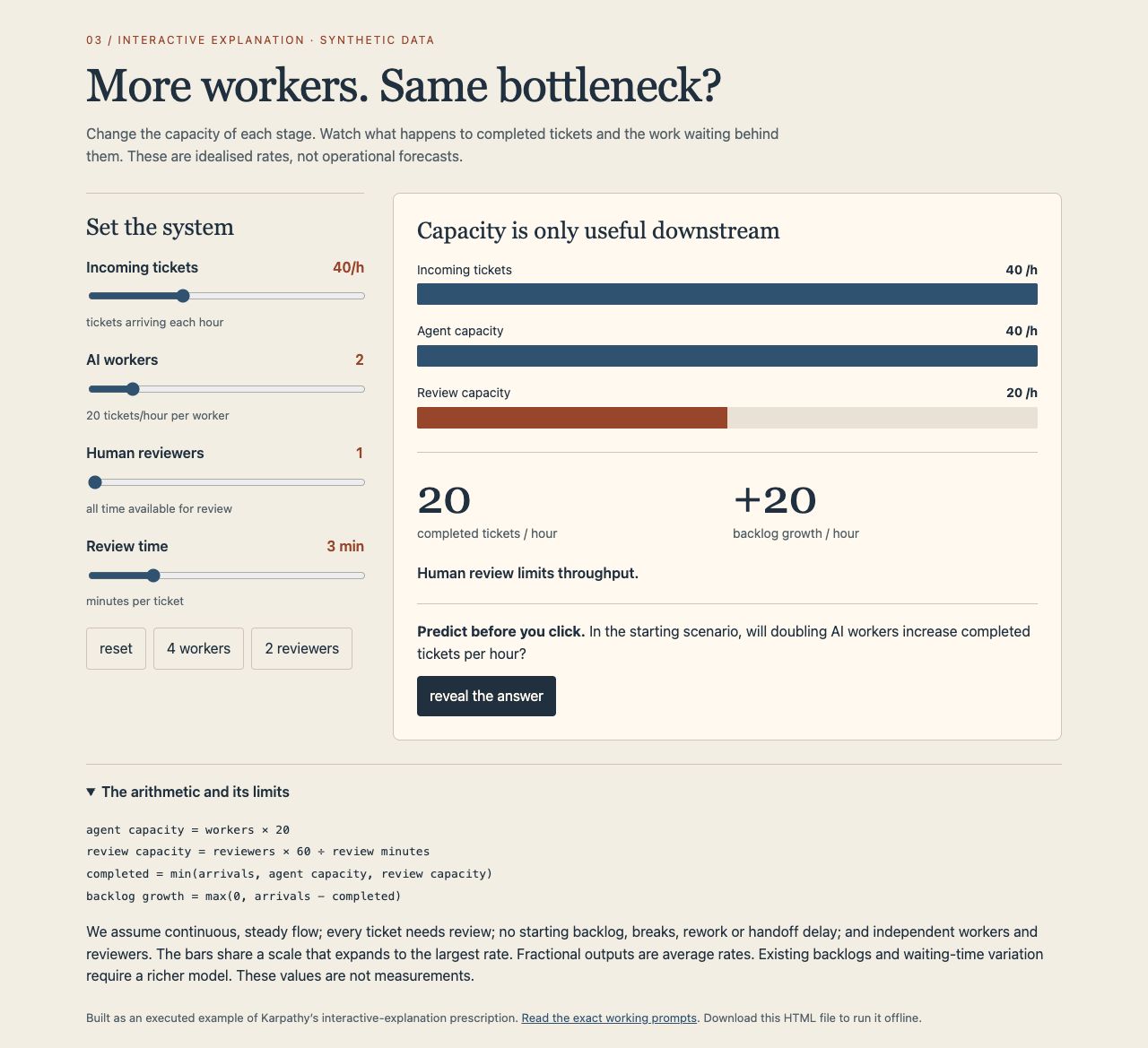
Actual webpage at the starting settings. Open the interactive bottleneck lab. It also works as a downloaded HTML file.
I checked these cases in the browser against hand calculations:
| Scenario | Agent capacity/h | Review capacity/h | Completed/h | Backlog growth/h |
|---|---|---|---|---|
| 2 workers, 1 reviewer | 40 | 20 | 20 | 20 |
| 4 workers, 1 reviewer | 80 | 20 | 20 | 20 |
| 2 workers, 2 reviewers | 40 | 40 | 40 | 0 |
Synthetic steady-flow cases: 40 arrivals/hour, 20 tickets/hour per worker, three minutes of review per ticket.
The calculation is completed = min(arrivals, agent capacity, review capacity). Backlog growth is arrivals minus completions, floored at zero. Zero arrivals also correctly returned zero completions and zero growth. The scenario buttons, answer reveal, keyboard control and mobile width were checked.
The limits matter: this page does not estimate waiting-time distributions, clear an existing backlog, or model breaks and rework. Within its stated assumptions, moving one control makes the constraint easier to see than another paragraph would.
Try it on travel planning
Build an offline HTML packing planner for a trip. Let me set days, laundry frequency, bag weight limit and item weights. Separate required items from optional items. Show total weight and explain each suggested removal. Use my inputs rather than invented airline rules. Include reset, keyboard controls and a printable list. Check the totals with two hand-worked cases.
Try it on a classroom concept
Build an interactive HTML lesson on mixing coloured light. Provide red, green and blue sliders, a resulting colour swatch and numeric values. Explain additive light mixing and why this differs from mixing paint. Include three prediction questions with revealable answers. Use an authoritative optics source, accessible controls and a description that does not rely on colour alone.
Try it on a café operation
Create a self-contained HTML café-capacity calculator. Let me vary orders/hour, baristas, preparation minutes/order and espresso-machine capacity. Display the limiting stage and show every formula. Use explicitly synthetic inputs; exclude queue variability and label that limitation. Add two contrasting scenarios and test the arithmetic. Make it usable on a phone.
Practitioner example 4: an explainer video that shows the change
For video, I reused the webpage’s numerical example. That gives us a fairer comparison of representations: the page lets you explore; the video controls the order of discovery.
Karpathy’s post suggests bespoke mathematical explainers with narration. Our version uses original geometric animation and a local voice, with no paid narration account required for this run.
The working prompt — animate the bottleneck
Create a 35-45 second narrated mathematical explainer for team leads: why more AI workers may not speed up approvals. Use this synthetic example: 40 tickets arrive per hour; two workers can draft 20 each; one reviewer takes three minutes per ticket. Animate the flow, show the 20/hour review ceiling, then double workers without changing completed throughput. Finish by doubling reviewers, which raises the idealised completed rate to 40/hour. Label this a simplified steady-flow model with no breaks or rework. Use clear geometric animation and original visual design, English narration, captions, no music, and a readable 16:9 layout. Use an available local speech engine if no voice service is connected. Produce an MP4, an English VTT caption file and representative stills. Check every number and inspect the rendered clip.
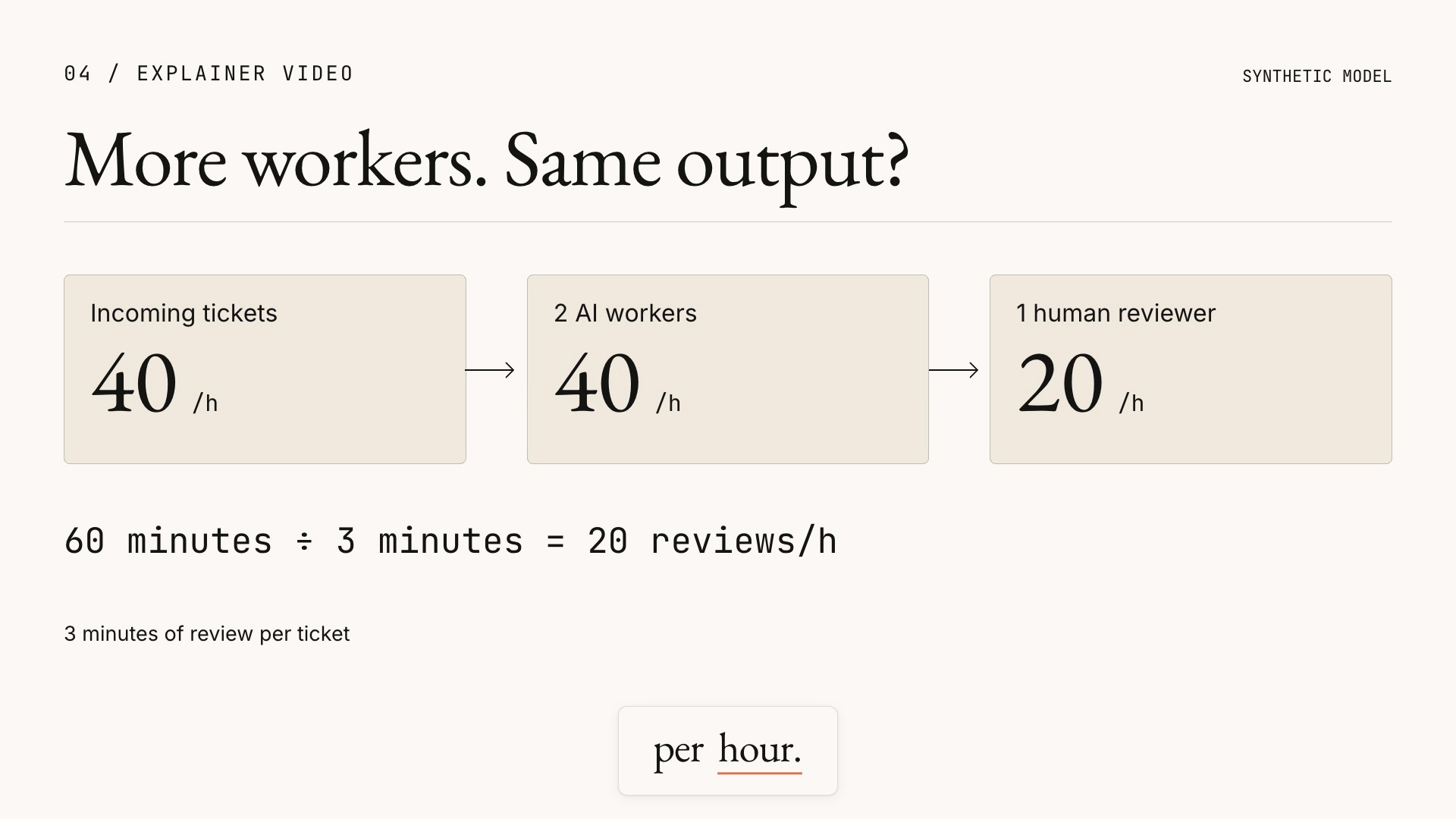
A frame from the actual rendered clip. The video below includes synthetic narration and captions.
The finished clip is approximately 44 seconds. It introduces the review ceiling, doubles workers, then adds a reviewer. Its lesson remains readable without playing it: extra drafting capacity does not raise completions while review stays constrained; doubling review capacity changes this particular result.
Production used HyperFrames for coded animation and rendering, Kokoro for speech, and transcription timings for captions. The build needed selector and spacing corrections before its checks passed. That is part of the result: Astra helped produce the artifact through a tool workflow. It did not emit a finished narrated video natively.
Try it on mathematics
Make a 45-second narrated animation explaining why repeated doubling eventually outruns adding ten. Compare sequences starting at one: add ten each step versus multiply by two. Label the axes and compute all displayed values in code. Show the crossing point. Deliver MP4, captions, transcript and stills. Use original visuals and an available speech engine.
Try it on biology
Create a 60-second explainer showing how water moves through a plant, for secondary-school learners. Use a university or botanical institution as the factual source. Distinguish roots, xylem, leaves and transpiration. Label simplifications. Deliver a narrated MP4, captions and transcript. Verify that arrows and narration describe the same direction of movement.
Try it on everyday technology
Create a 45-second explainer showing why noise-cancelling headphones reduce some sounds better than others. Use manufacturer engineering documentation and an acoustics source. Animate the simplified wave relationship, then show a limitation. Avoid promising perfect silence. Deliver original animation, narration, captions, transcript and three stills. Inspect the final render for sync and legibility.
How closely does this align with GPT-6 Astra?
The practical fit is strong across all four formats in this run. The division of labour is specific: Astra wrote text and code; PDF, browser, animation and speech tools turned that work into artifacts. The Astra API specification lists text input/output and image input, while native audio and video remain unsupported. Tool access is part of the product you are using, so the same prompt may produce a file in one environment and only source code in another.
That supports Karpathy’s production idea. It does not establish that Astra teaches better than Claude, Gemini or a human-written explanation. I have not run a controlled comparison of those systems here. To compare them, keep the sources and task constant, then ask readers to explain the mechanism and predict a new case. A screenshot proves that an artifact exists; a correct prediction is better evidence that it helped someone understand.
My rule for the next task is simple:
This extends the editable-artifact handoff: give people an explanation they can use, inspect and change. Start with one of the sixteen prompts. Supply your own source material, run the output, and check whether someone else can answer a question the original prose made difficult.
What's in it for you
- Four worked examples with screenshots, plus editable or playable outputs.
- Sixteen prompts to adapt across technical work, science, daily life and team operations.
Specify the explanation, build it, and check what the reader can now understand.
Sources
- Andrej Karpathy — original post, 2 October 2026.
- ASD STEMG — Simplified Technical English FAQ, accessed 2 October 2026.
- Cloudflare — What is DNS?, accessed 2 October 2026.
- OpenAI — Retrieval guide, accessed 2 October 2026.
- OpenAI — GPT-6 Astra API specification, accessed 2 October 2026.